AGAMA Car Launcher
- 4.5
- Rating
- 5.00M
- Installs
- Free
- Price
 Analysis by App-foxy
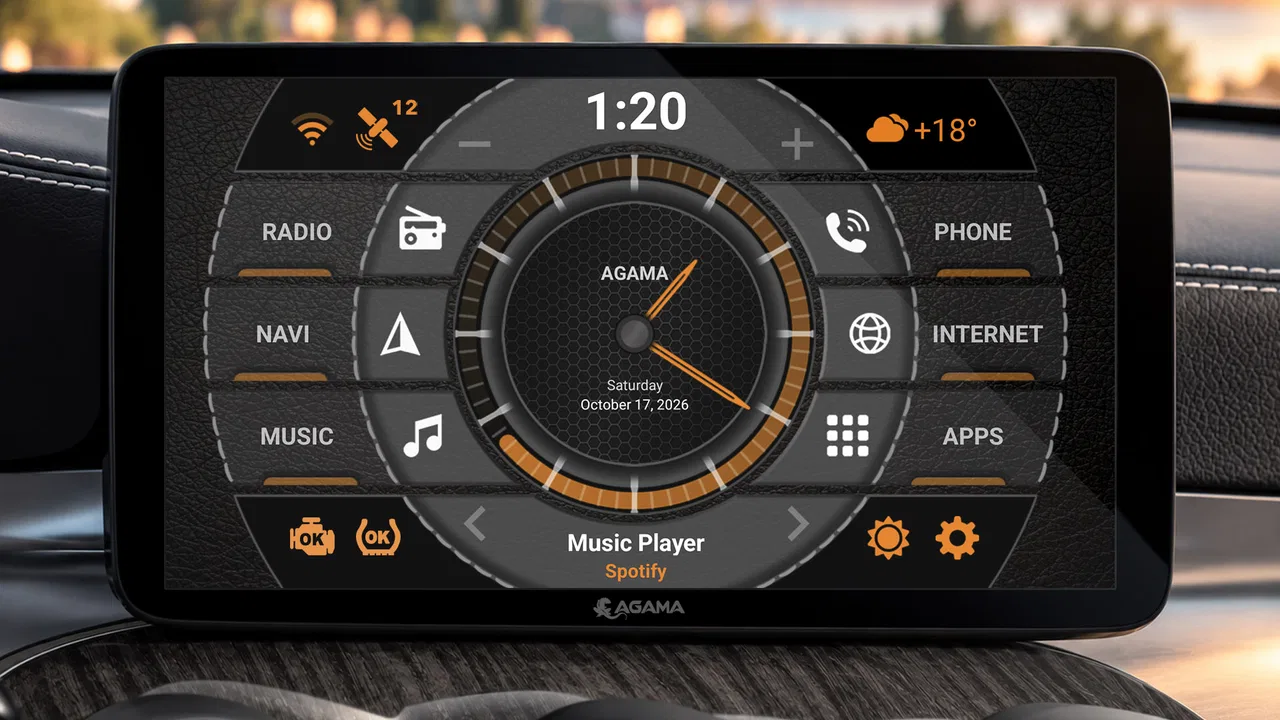
AGAMA Car Launcher is the kind of Android app that makes the most sense when your phone or tablet is permanently connected to a vehicle. I used it as a dedicated front end for driving rather than as another ordinary home screen, and that distinction matters. It is designed to put navigation, music, communication, and vehicle-related shortcuts in a layout that feels more appropriate behind the wheel than a standard Android launcher.
That focus gives it a clear purpose, but it also means this is not automatically the right choice for every Android device owner. If you want a normal launcher for a phone, AGAMA can feel unusually specialized. If you have an Android-based car multimedia system and dislike digging through small icons while driving, its approach is much easier to appreciate. The app is free to start, carries an Everyone age rating, and offers a 30-day trial for its launcher experience, with optional purchases listed at $8.49 per item.
How AGAMA feels in a real car setup
The first thing I noticed is that the app treats the screen as a dashboard rather than a general-purpose app grid. That changes how I think about every interaction. A conventional Android home screen is built around browsing, widgets, notifications, and app discovery. AGAMA is built around reaching a familiar driving function quickly, with less visual wandering.
You May Also Like

 Blood Strike: 2.5 Anniversary
Blood Strike’s Loadouts Turn Every Drop Into a Tactical Gamble
A close look at Blood Strike’s custom loadouts: how fast access to signature weapons reshapes its battle royale rhythm, rewards preparation, and narrows the gap between fights.

 Pandora - Music & Podcasts
Pandora’s Music Is Easy to Start, but Harder to Recover
Pandora’s strength is its low-effort path from a seed to a station. Its weak spot is how much confidence it asks you to place in connection, setup, and quiet recovery.

 8 Ball Pool
 Is Built on Rivalries, Rematches, and Routine
A close look at the rivalries, rematches, shared routines, and unanswered safety questions that turn a quick pool match into a persistent mobile community.

 Samsung Music
’s Quiet Strength Is Playing What You Already Own
Its reach comes less from spectacle than from dependable access to a personal library. That simplicity is both the app’s strongest retention engine and its ceiling.

 AccuWeather: Weather Radar
AccuWeather Review: A Quick, Clear Forecast for Everyday Decisions
For everyday plans, the best forecast is the one you can understand quickly. AccuWeather makes rain timing, radar, and local conditions easy to act on, with a few trade-offs.

 Hill Climb Racing
Why Hill Climb Racing Still Turns Crashes Into One More Run
A tiny car, a bumpy hill and one more upgrade: Hill Climb Racing keeps resurfacing because its simple chaos makes every near-miss feel personal.
More From Our News Desk



That is especially useful on a larger in-dash display. On a phone mounted near the windshield, the benefit depends heavily on the screen size and the quality of the mount. On a dedicated Android head unit, the interface has more room to breathe and feels much closer to the product’s intended setting. The app’s store summary describes it as a home screen for car multimedia systems running Android, and my experience matches that positioning: it is best understood as a vehicle interface, not simply a prettier launcher.
I also like that the idea is easy to understand without a long learning period. You install it, set it as the launcher if your system allows that, and begin arranging the functions you use most. The practical advantage is not that it replaces every automotive system feature. Instead, it gives the Android layer a more focused starting point, so navigation or audio is closer to the surface than it may be on a factory-style Android interface.
There is an important safety caveat here. A better layout does not make it safe to browse while moving. I would configure AGAMA while parked, keep the home screen limited to genuinely useful shortcuts, and avoid treating its visual polish as an invitation to interact more often. The best car launcher is the one that reduces screen time, not the one that encourages constant customization during a trip.
The current version and the app’s maturity
The current release is version 5.0.2, while the app itself has been available since July 27, 2017. That history helps explain why AGAMA feels like a focused product rather than a quick experiment. It has had time to establish a recognizable role in the Android Auto & Vehicles space, and its audience is substantial: more than five million installs, with an average rating of 4.5 from roughly forty-six thousand ratings.
Those figures do not guarantee that it will behave perfectly on every head unit. Android car hardware varies widely, especially in screen proportions, touch responsiveness, audio routing, and the way the manufacturer handles default applications. Still, the size of the user base makes AGAMA easier to take seriously than an untested dashboard skin. The developer, altercars.ru, has built something that clearly appeals to people looking for a dedicated driving interface.
I would describe the current state as established but hardware-dependent. The launcher can make a compatible Android multimedia system feel more coherent, yet it cannot erase the quirks of the underlying device. A sluggish head unit will still be sluggish. A system with unusual steering-wheel controls may not suddenly gain perfect integration. That is why I would judge the app together with the car hardware, not in isolation.
What the version history means in practice
Version 5.0.2 is useful context because it tells a potential user that the product is being considered as a current, maintained release rather than an old installation left untouched. I would not turn that version number into a promise of a particular feature or redesign, because the number alone does not prove how every screen has changed. What it does show is that the app has moved beyond its original launch period and remains available in a modern form.
For someone already using an earlier edition, the sensible approach is to update when the vehicle is parked and then check the essentials one by one. Confirm that the launcher still opens as expected, that your preferred navigation and audio apps remain easy to reach, and that the display is comfortable in both bright and dark conditions. A launcher update can affect the feel of the whole device even when your underlying apps have not changed.
New users should also resist the temptation to judge the app only by its first few minutes. A car launcher earns its place through repeated routines: starting a route, switching audio, returning to the dashboard, and finding a frequently used function without hesitation. I found that the value becomes clearer after setting up the screen around actual driving habits rather than leaving the default arrangement untouched.
The 30-day trial is particularly useful for this kind of decision. Car interfaces are personal, and compatibility is difficult to predict from screenshots. I would use the trial to test the app during several ordinary journeys, including a short local drive and a longer route, while parked before departure to make adjustments. That gives you time to discover whether the layout suits your screen and whether the launcher remains comfortable after the novelty wears off.
Who benefits most from the dashboard approach
AGAMA is a strong fit for drivers who have an Android-powered head unit and want a consistent starting screen. It is also appealing to people who have installed several vehicle-related apps and are tired of a generic home screen that treats a navigation tool, a music player, and a settings panel exactly like unrelated phone apps.
I can see it being especially helpful for a family vehicle shared by several drivers. A carefully arranged dashboard can make the system less dependent on one person remembering where everything is. The key is to keep the arrangement restrained: put the functions people actually use at the front, and avoid turning the screen into a crowded collection of every installed app.
It can also suit someone upgrading an older Android multimedia system without replacing the entire unit. A launcher cannot improve the processor or screen, but a more purposeful interface may make existing hardware feel less awkward. This is one of the app’s more practical strengths: it changes the way the Android layer is organized without requiring a new vehicle system.
On the other hand, I would skip it if your car already has a polished, responsive interface that you prefer. There is little point in adding another layer simply because it looks different. I would also be cautious if your device is used mostly as a handheld phone. A general launcher will usually be more flexible for everyday apps, widgets, and notifications, while AGAMA’s vehicle-first design may feel restrictive away from the car.
Three setup lessons that are easy to miss
The first useful lesson is to configure by driving frequency, not by app category. It is tempting to group everything neatly, but the most efficient layout is often the one that reflects your routine. If you always start navigation before audio, place those actions where your eyes naturally go in that order. If you mostly use the system for audio and occasional maps, do not give equal visual weight to tools you rarely touch.
The second is to test the launcher with the car’s physical controls, not only with the touchscreen. A dashboard can look excellent while parked and still be awkward when you use steering-wheel buttons, a rotary controller, or the vehicle’s volume controls. I would spend part of the trial checking whether returning to the home screen feels predictable and whether the launcher remains useful when you keep your hands away from the display.
The third is to treat customization as a maintenance decision. Every extra shortcut creates another visual choice. I found that a simpler screen is usually better after the initial setup, particularly at night or when the road requires more attention. AGAMA gives you a dedicated environment, but the quality of that environment depends on whether you use its flexibility to remove clutter or to add more of it.
A fourth consideration is recovery. Before changing the launcher on a vehicle you rely on daily, make sure you know how to return to the previous home screen or system launcher. The exact process can vary by Android head unit, so I would check the device’s settings while parked. This is not a criticism of AGAMA specifically; it is a sensible precaution whenever an app becomes the main entry point to the system.
How it compares with ordinary launchers and built-in systems
Compared with a standard Android launcher, AGAMA wins through focus. A normal launcher is usually better for broad customization, phone-style widgets, and switching between many unrelated apps. AGAMA makes a stronger case when the display is mounted in a vehicle and the main tasks are predictable. Its advantage is not unlimited freedom; it is a more deliberate hierarchy.
Compared with a factory vehicle interface, the result depends on what your car already provides. A built-in system may offer tighter integration with vehicle controls and information that a third-party Android launcher cannot reproduce. AGAMA can still be preferable when the factory interface feels dated, when the Android head unit is the main source of navigation and audio, or when you want a consistent layout across a nonstandard multimedia installation.
Compared with using Android Auto or another phone-projection method, AGAMA serves a different purpose. Projection systems are convenient when you want phone apps presented through a driving-oriented connection. AGAMA is more relevant when the Android operating system lives directly on the car multimedia device and you want that device’s own home screen to feel purpose-built. Choosing between them comes down to where you want the apps to run and how much control you want over the head unit’s starting environment.
That distinction also explains a possible weakness. A dedicated launcher can make the system feel unified, but it may expose differences between apps more clearly. Navigation, audio, and vehicle utilities can each have their own controls and behavior. AGAMA organizes the doorway to those apps; it does not turn every underlying application into one perfectly consistent automotive experience.
Where the friction remains
The biggest limitation is compatibility uncertainty. Android multimedia systems are not standardized in the same way, and a launcher’s experience can change with screen dimensions, system software, available controls, and manufacturer modifications. I would not buy or install it expecting the same result shown on another person’s dashboard. The trial should be treated as a compatibility check, not merely a preview.
The app may also be more effort than some users want. A person who expects to install it and receive a flawless personalized dashboard immediately could be disappointed. The best results require choosing what belongs on the home screen, testing the arrangement, and removing shortcuts that do not help. That is a reasonable trade-off for control, but it is still a trade-off.
There is also the question of cost after the trial. The app is free to download, but optional in-app purchases are listed at $8.49 per item. I would make the purchase decision only after testing the launcher in the actual vehicle, because the value depends on whether it improves daily use rather than simply looking attractive during setup. For a rarely used spare device, the free starting point may be enough to evaluate it; for a primary head unit, the paid option can make more sense if the workflow genuinely becomes faster.
Finally, a launcher cannot solve every annoyance associated with an Android car system. It will not automatically fix poor audio behavior, unreliable connectivity, weak GPS performance, or hardware that struggles with modern apps. If the underlying problem is the head unit itself, changing the home screen may make the device nicer to enter but will not transform its core performance.
Questions I would settle before installing
If you are wondering whether it will work on your particular car, I would begin with the Android version and the head unit’s launcher settings. The listed minimum operating system is Android 5.0, so older devices may qualify on paper, but that does not guarantee a comfortable result on a vehicle display. Check whether the system permits a third-party home screen and whether you can switch back easily before making changes.
If you are concerned about the trial, use it as a real-world test rather than a quick glance. Set up the dashboard, drive your normal routes, use the controls you depend on, and see whether the arrangement remains readable and practical. Testing only while parked tells you how it looks; testing across routine use tells you whether it actually reduces friction.
If you already have a launcher you like, compare tasks rather than appearances. Time how many steps it takes to reach your usual navigation or audio action, then ask whether AGAMA makes that sequence clearer. A familiar phone-style launcher may still be better if you frequently open unrelated apps or rely on widgets that do not fit the car-oriented layout.
If you share the vehicle, decide on a common arrangement before adding personal shortcuts. A dashboard that works for one driver but confuses everyone else is not an improvement. I would keep the first screen focused on shared essentials and place less frequent tools elsewhere, so the interface remains understandable when someone else starts the car.
If you are considering it for safety reasons, keep expectations realistic. The app can help organize the display, but safe driving still depends on preparing routes and audio before moving, using voice controls where appropriate, and avoiding visual interaction whenever traffic demands attention. Its strongest safety contribution is indirect: a cleaner starting point can reduce unnecessary searching, provided you configure it with restraint.
My recommendation after living with the concept
I recommend AGAMA Car Launcher to owners of Android car multimedia systems who want their home screen to behave like a dashboard instead of a phone desktop. The app has a clear identity, a mature presence in the category, and enough flexibility to support different driving routines. Its current version, 5.0.2, makes it a reasonable option to test now, while the trial gives you a practical way to judge the fit on your own hardware.
I would not recommend installing it blindly on every Android device. The app is too specialized for that. Drivers who already like their factory interface, people who mainly need a handheld phone launcher, and users with unreliable or very slow head units may be better served by keeping their current setup or addressing the underlying hardware first.
What I appreciate most is the trade-off it makes openly: fewer general-purpose launcher habits in exchange for a more focused automotive starting point. When the layout matches your routine, that trade-off feels worthwhile. When your needs are broad or your hardware is unusual, the same focus can feel limiting. That is why I would configure it carefully, test it for the full trial period, and judge it by how naturally it supports real drives rather than by how impressive the dashboard looks at first.
For a free starting point in the Auto & Vehicles category, backed by a 4.5 average and over five million installs, it is a credible app to try. The developer is altercars.ru, and the Everyone rating makes it broadly accessible, but the real decision is personal: AGAMA is most valuable when your Android screen is part of the car, not merely a phone placed inside it.
FAQs for AGAMA Car Launcher
01What is AGAMA Car Launcher and how does it enhance my driving experience?
AGAMA Car Launcher is an intuitive app designed to optimize your car's infotainment system. It provides a customizable interface for easy access to music, navigation, and other apps while driving. With large buttons and voice control, it minimizes distractions and enhances safety, making it a valuable tool for any driver.
02Is AGAMA Car Launcher compatible with my car's system?
AGAMA Car Launcher is compatible with most Android devices and can be used in any car with an Android-based head unit or a connected smartphone. However, it’s important to check if your car’s system supports Android apps and ensure your device is running on a compatible Android version for optimal performance.
03What customization options are available in AGAMA Car Launcher?
AGAMA Car Launcher offers extensive customization options, allowing users to personalize the interface with different themes, colors, widgets, and layouts. You can set quick access to your favorite apps and adjust the dashboard to suit your preferences, ensuring a tailored driving experience that meets your specific needs.
04Does AGAMA Car Launcher support voice commands?
Yes, AGAMA Car Launcher supports voice commands, enabling you to control the app hands-free. This feature allows you to navigate, play music, or make calls without taking your hands off the wheel, significantly enhancing safety and convenience while driving.
05Is there a cost associated with downloading or using AGAMA Car Launcher?
AGAMA Car Launcher is available for free with basic features. However, there are in-app purchases that unlock premium features, such as additional themes and advanced customization options. This allows users to choose a plan that fits their needs and budget, ensuring access to enhanced functionalities.
Pros
- Customizable interface enhances user experience.
- Smooth performance with minimal lag.
- Supports multiple widgets for convenience.
- Easy integration with car systems.
- Frequent updates improve functionality.
Cons
- Limited free features without upgrades.
- Some features require internet connection.
- Occasional bugs in older devices.
- Not compatible with all car models.
- In-app purchases can be pricey.

AGAMA Car Launcher
Gallery